EasyWorship's New Planning BETA Makes Planning for Sundays Easier Than Ever
Spend less time getting ready for Sunday, and less energy worrying about it.
We've just released a public BETA of our brand-new planning tool and for a limited time it's free for every EasyWorship subscriber.
It's built to do one thing well: give your team a single place to organize what's happening in your service, from the worship setlist to who's serving. And because we make your presentation software too, we're building this to connect to it directly, so the plan you build becomes the slides you run. More on that in a minute.
It's an early BETA, so expect some rough edges. Finding them is part of the point.
Let's dive into what it's all about.
Putting Sunday together by hand
Sundays, and the work leading up to them, can be stressful and draining.
Slides get out of order because the worship team changed how they're singing a song at the last minute. The worship leader spends an hour sending the setlist and charts to every musician. The tech volunteer builds the presentation on Sunday morning because the sermon came in the night before.
These are different symptoms with the same root cause. Planning and presentation have always been separate, so people end up carrying the connection between them. That shows up three ways.
Nothing in one place. Planning happens in pieces, so the service is only as organized as whoever pulls it together.
Slides built from scratch. None of it carries over to the presentation software, so someone opens it and starts from a blank screen.
Changes that get missed. Someone has to carry every change to everywhere it already went, with no system keeping it all together.
There aren't many tools that solve these problems, and the ones that do introduce other limitations. Here's how we're working to fix that.
Bring the whole service together in the agenda
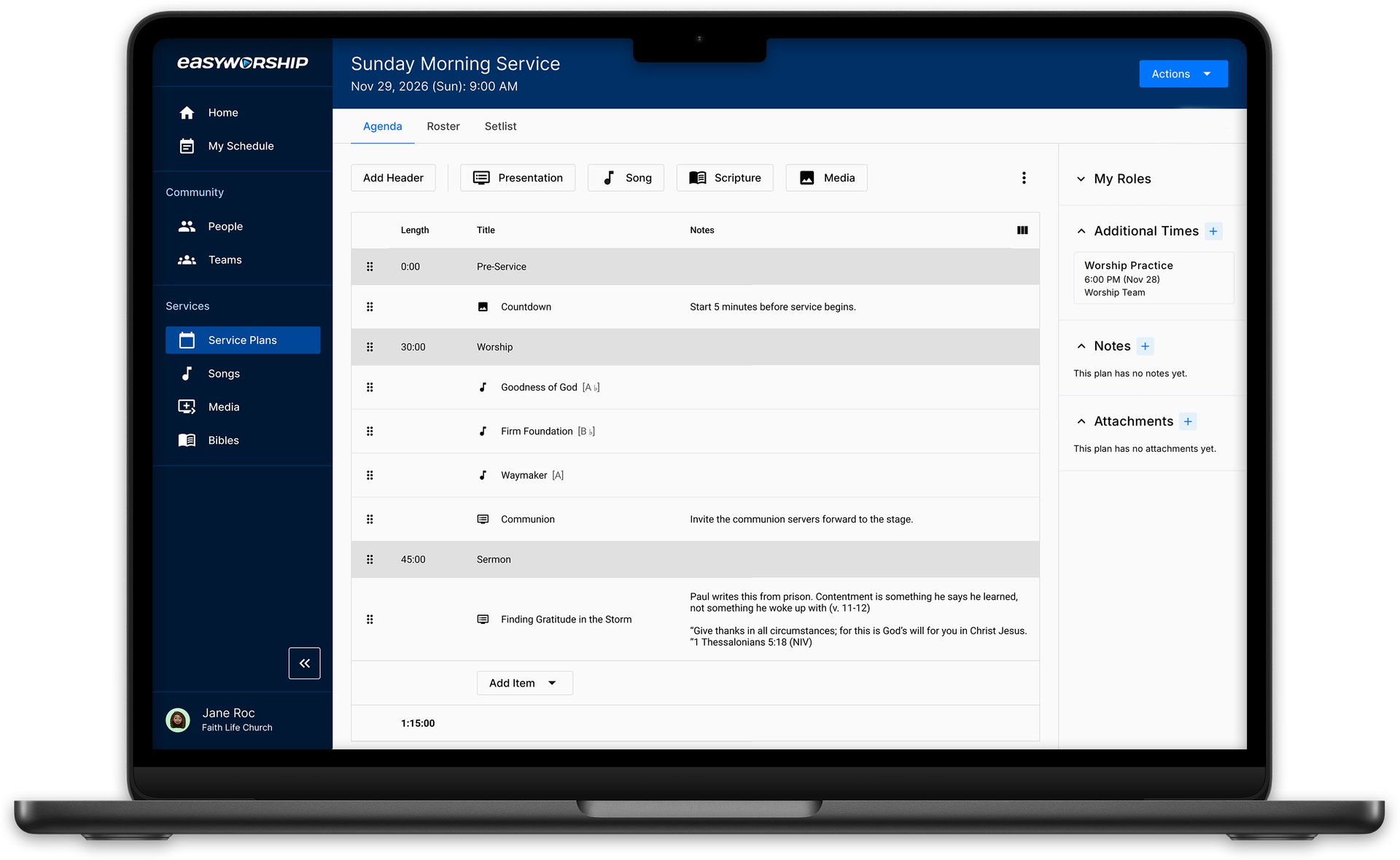
Our new platform is centered around the service plan, which includes an agenda to detail what's happening in your service. An agenda allows you to create a timeline for your service and has many of the same resources as our presentation software: songs, scripture, and media.
Unlike a printed run sheet or a Word document sitting in a folder, an agenda is a living document. Everyone on your team can access the same up-to-date version at once, so there's no chasing down the latest file or wondering if the copy in front of them is current.
Once your agenda is built, you can export it and import it into the presentation software as slides, so nobody starts from a blank screen on Saturday night.
But our service planning tool isn't limited to the agenda.
Planning the rest of your service
An agenda covers what happens on Sunday. The rest of the plan covers who makes it happen, and what they need to be ready.
Schedule your team in the roster
Most volunteer scheduling lives in a text thread. You send the ask on Tuesday, three people reply, one replies to the wrong thread, and by Saturday you're going on memory to work out whether anyone's covering the sound board.
The roster takes that over. Add a team to your plan and its roles come with it. Say how many people you need for each one, fill the spots from the people who actually serve in them, and send the requests all at once or one at a time.
Volunteers get an email and can accept or decline right from it, without creating an account. Nothing changes about what you're asking them to do. What changes is that you can look at one screen and see who's confirmed, who hasn't answered, and what's still open.
Send what your musicians need in the setlist
Every plan has a setlist: the service's songs in order, with lyrics, chord charts, keys, and any notes you left for the team.
When it's ready, choose which teams should get it. They'll get an email with the song list and a link to the full setlist, which means one send instead of six and no hunting for the chart in the right key. If something changes, send it again and they'll get the update.
It's the difference between your bass player finding out about the key change on Thursday and finding out about it at 8:45 Sunday morning.
Build once in your libraries
Behind every plan are the resources your team pulls from, and they only have to be set up once.
Songs are the big one. Import from SongSelect or add your own, and keep the lyrics and chord charts on the song itself instead of in a folder somewhere. The next time you sing it, all of that comes with it. Media works the same way. Keep your images and videos in one library, and pull in professionally made media from the EasyWorship Media Store with a premium subscription.
Community is where your people live. Add the ones who serve at your church, group them into teams, and give them the roles they fill. Do that once and scheduling a service becomes picking names off a list.
Looking forward, your plan and your slides will connect on their own
Most planning tools stop at the plan. They can tell you what's happening on Sunday, but they can't do anything about what ends up on the screen, because the screen belongs to somebody else's software. The best they can offer is a handoff.
That gap is the reason we started here. We make both sides. So rather than building a planning tool that hands off to a presentation tool, we're building one service that lives in two places.
Today that means exporting your agenda and importing it into the presentation software, which is a real head start but still a step someone has to take.
What we're building toward is a connection that keeps itself. Change a song in your agenda and the schedule updates. Change the schedule and the agenda updates. Your songs and media libraries stay connected across both, so what you add in one is there in the other. Nobody carries anything between them.
Full sync won't be part of the BETA. It's one of the last major pieces before the full release, and it's what everything we're building now is pointing toward.
Beyond the slides
Connecting planning to presentation is where we started, but it isn't where we're stopping.
Sunday takes more than slides. It takes people who know where they're supposed to be, songs that reach the band in time, and a team that isn't guessing on the way in the door. Every one of those is work someone on your team is doing by hand right now.
We want to keep taking that work off their plate, piece by piece, so more of the week goes to ministry and less of it goes to logistics. What you tell us during this BETA will shape what we build next.
How to get started
The BETA is free for every EasyWorship subscriber, including anyone on a trial. There's no signup. Sign in with your EasyWorship account and start planning.
A few things worth knowing:
- Everything you build during the BETA stays with you when the product is fully released.
- Pricing will be announced before the BETA ends, so you'll know what's coming before anything changes.
- The SongSelect integration requires your own SongSelect subscription, and the Media Store requires a premium subscription.
When you sign in, there's a tutorial to walk you through the basics. From there, we want to hear what's working and what isn't. Join the EasyWorship users group on Facebook to share ideas, ask questions, and report bugs, or contact support for anything specific to your church.
Try it before this Sunday. Use it, test it, break it, and help us build something that makes Sunday a whole lot easier.
Start planning today.