Release Rundown - EasyWorship 8.1
EasyWorship's presentation software 8.0 brought quite a few back-end, under-the-hood style changes to our presentation software as well as availability on Mac. With EasyWorship presentation 8.1, we added a few exciting new features, made some significant user experience improvements, and deployed a metric TON of bug fixes. Check it out below! Also, we have some huge new features on the horizon for our presentation software in the coming months, so enjoy EasyWorship 8.1 and stay tuned for what's next.
Song Lyric Reflow
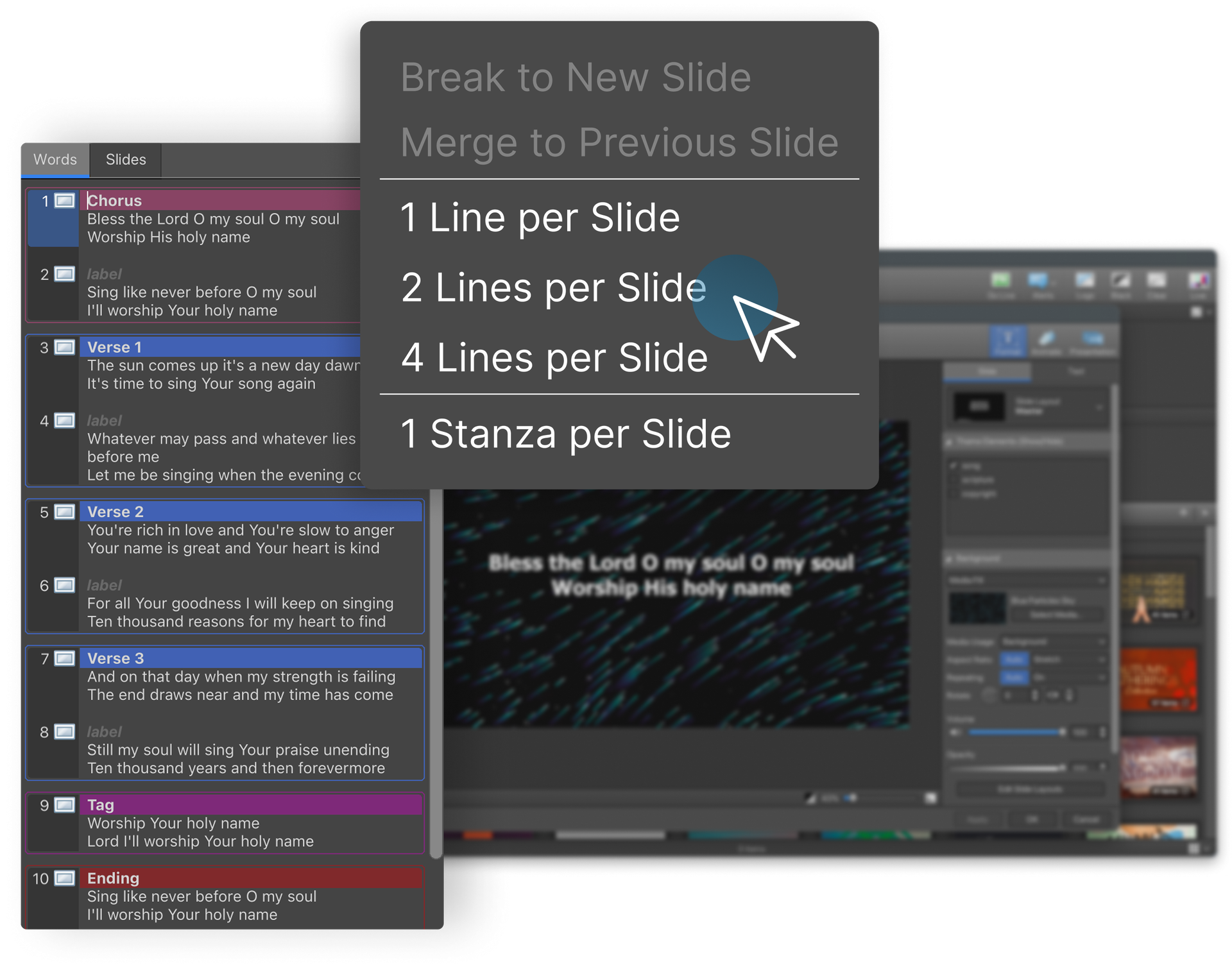
Song Lyric Reflow redefines the way that you import and add songs to your schedules. By automatically breaking songs into pre-determined lines per slide, you can build your slides quickly and consistently. You can break songs bu 1 line per slide, 2 lines per slide, 4 lines per slide, or even an entire stanza per slide.
Default Theme Selections
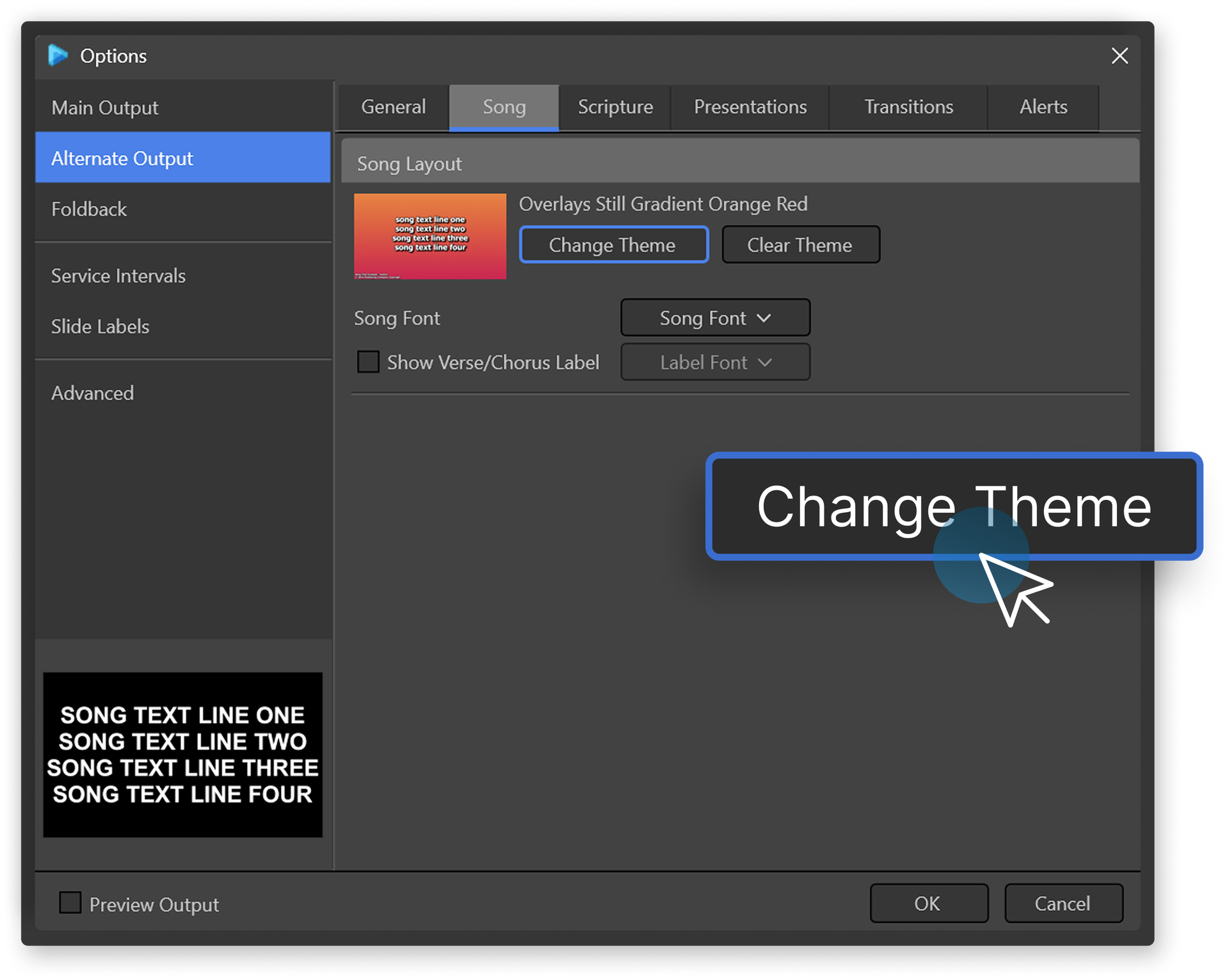
Default Theme Selections for each content type can now be set from Options, with a thumbnail preview, rather than only by right-clicking in the theme selector.
QoL Improvements
- Media thumbnails redraw faster when browsing the library.
- Resizing panels with a splitter repaints less, so it feels smoother.
- The background Helper works through imported media much faster, so a newly imported profile is ready sooner.
- If EasyWorship cannot finish updating a profile's data because files in it are in use, the message now says which folder and files are affected and, on Windows, which program is holding them.
- Volume controls are disabled while media is muted.
- Improved PowerPoint compatibility (MacOS). To apply it to a presentation already in your library, right-click the presentation and choose Refresh.
- 24 fps video plays smoothly on a 60 Hz output, even when the main display runs at a different refresh rate (Windows).
- The transition easing slider now shows the name of the current easing, such as Smooth or Bounce.
- NDI updated to version 6.3.2 (Windows and MacOS).
Bug Fixes
- Fixed crash when clicking "Skip these files" while importing media that already exists.
- Fixed EasyWorship freezing for several seconds when switching profiles or closing.
- Fixed EasyWorship appearing frozen after creating your first profile, caused by a prompt hidden behind the main window.
- Fixed crash when removing items from a list.
- Fixed the cloud sign-in popup not always closing properly.
- Fixed problems when quitting with a web popup still open (MacOS).
- Fixed advancing past the last slide of a live PowerPoint returning to the start of the deck instead of moving to the next schedule item, in Preview and Live Combined view.
- Fixed alert text being clipped when the output size had changed since the last session.
- Fixed preview controls being cut off, including a clipped slide count and missing seek, repeat and volume controls.
- Fixed presentation editor thumbnails going stale or flickering while they rebuilt.
- Fixed blank shape selector thumbnails on high resolution displays.
- Fixed sluggish element dragging in the presentation editor when the Slide Selector tab was open.
- Fixed selector thumbnails being too narrow, with clipped titles, on vertical outputs.
- Fixed the presentation editor using more memory each time it was opened.
- Fixed drop targets showing a "+" for files they would not accept, and files being dropped where they should not be.
- Fixed delayed video scrubbing on the progress bar (MacOS).
- Fixed garbled accented characters in the Scripture Selector's More Available list.
- Fixed right-clicking the Web tab showing the browser's own menu.
- Fixed the Web tab flashing when resizing the Premium Media or SongSelect panels.
- Fixed multi-line text boxes having no scrollbars.
- Fixed the crash report dialog ignoring the light theme (MacOS).
- Fixed upgrading from 7.4 losing Alt output settings, Advanced options, hotkeys and remote control settings.
- Fixed an Alternate Output sent over NDI showing nothing, going black, or staying on an earlier slide while PowerPoint was live, most often on high resolution outputs with display scaling.
- Fixed the preview of a monitor FoldBack output being shrunk with large black borders when the FoldBack had a taller shape than the main output.
- Fixed an occasional Helper crash while downloading Premium Media.
- Fixed Help > Background Helper opening the Helper behind the EasyWorship window on the first click (Windows).
- Fixed a profile's sort order language being named in the language of the computer that last changed it, instead of this computer's language.
- Fixed images, audio and video with very long file names failing to import.
- Fixed one notch of the mouse wheel scrolling thumbnail views by several rows, often a whole page.
- Fixed the Scripture popup in the presentation editor going back to Genesis 1:1 after a verse was dragged from it.
- Fixed PowerPoint pausing for a few seconds at a time after a presentation had been shown in EasyWorship (Windows).
- Fixed turning on Remote Control from the toolbar not offering to install Bonjour when it was missing (Windows).
- Fixed opening a schedule or license file doing nothing while EasyWorship was already running. EasyWorship now comes to the front and opens the file.
- Fixed schedules and license files not opening from Finder (MacOS).
- Fixed slides not being draggable out of a song or presentation in the schedule, as they could be in EasyWorship 7.
- Fixed Save staying disabled after moving slides or items into another schedule item.
- Fixed undoing a Delete that joined two song slides leaving the second slide's lyrics on the first slide as well.
- Fixed a crash when dragging an empty selection from a text box or the song editor (MacOS).
- Fixed the live output being clipped or bordered after changing its monitor or settings while a web page or PowerPoint was live, and a PowerPoint show staying small until it was sent live again.
- Fixed shortcuts set in Options > Slide Labels not working, number pad keys not working as label shortcuts, and a label with several shortcuts breaking "0 Enter" for the chorus.
- Fixed Cmd being ignored in shortcuts (MacOS). Shortcuts that use Cmd need to be set again.
- Fixed searches limited to a field such as lyrics no longer finding an item after it was renamed in the library list.
- Fixed information sent to some web pages, including the CCLI SongSelect sign-in, being cut short by one character (MacOS).
- Fixed the Copy From buttons in MIDI configuration doing nothing when clicked.
- Fixed hidden slides in a PowerPoint presentation being included in EasyWorship (Windows). For a presentation already in your library, right-click it and choose Refresh.
- Fixed a search for only punctuation or symbols showing every item instead of none.
- Fixed the library tree drawing a red or garbled strip over the toolbar below it (MacOS).
- Fixed libraries keeping their old appearance after being disabled or after a style change (MacOS).
- Fixed mouse drags in the presentation editor's outline moving the text instead of selecting it, and some lists ignoring clicks, on PCs with a touch screen (Windows).
- Fixed the remote's live image of a PowerPoint slide being shrunk into a corner of a black frame.
- Fixed the Scripture popup in the presentation editor not scrolling to the end of the Bible when word wrap was on.
- Fixed EasyWorship closing without warning when another computer connected to or stopped receiving its NDI output (MacOS).
- Fixed a crash when dragging a slide out of the preview (MacOS).
- Fixed a crash when choosing some USB cameras, such as the Logitech C920, as a live feed (MacOS).
- Fixed a resolution or frame rate chosen for a camera in the Feed Editor going back to the old setting within a second.
- Fixed tokens in an alert's token list not being deletable, and newly added tokens appearing in the alert with no name.
- Fixed the media popup in the presentation editor drawing each row's title and file name on top of each other.